

You are using an out of date browser. It may not display this or other websites correctly.
You should upgrade or use an alternative browser.
You should upgrade or use an alternative browser.
Country, and city not showing in UI
- Thread starter neilgd72
- Start date

twisted1919
Administrator
Staff memberDid you properly setup the maxmind database? Follow the steps at https://www.mailwizz.com/kb/enable-campaign-geolocation-tracking-for-opens/ and download and place the file in the required location.I've set up geo custom fields of country and city, and have populated them programatically.
These seems to be yours, when another subscriber will visit, their details will show up.But when I click through to a subscriber, they all (every single one has the same details) look like this:
twisted1919
Administrator
Staff memberUnfortunately no, you need to use the maxmind database as suggested above.
twisted1919
Administrator
Staff memberNone I can think of, except if the data is not correct, but I assume that can be corrected.Any downside to modifying the ip address in the list_subscriber table and upserting into the ip_location one?


twisted1919
Administrator
Staff memberAre you sure the IP address is not a duplicate in that table? If it is, make sure you only keep one single instance.
twisted1919
Administrator
Staff memberI took a look in the code and it looks like:
So it will check the IP against the local database, and if it does not find it, will check against maxmind database.
So yes, it is enough to add the field.
PHP:
$geoCity = '';
if ($location = IpLocation::findByIp(request()->getUserHostAddress())) {
    $geoCity = $location->city_name;
}
So yes, it is enough to add the field.
neilgd72
New Member
That code looks like it comes from something which picks up where a subscriber is coming from when they eg click on a link? Which does seem to be working.
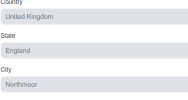
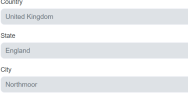
I think the issue that the correct information isn't being displayed on the subscriber details page, although it *is* displayed on both the summary grid and being populated when campaigns are sent.
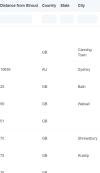
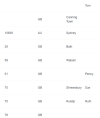
Here are the grid items:
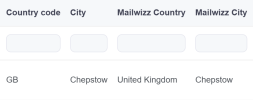
(The first 2 fields are text custom fields, and the second two are Geo fields).
And here is the subscriber details screen:
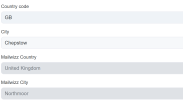
I think the issue that the correct information isn't being displayed on the subscriber details page, although it *is* displayed on both the summary grid and being populated when campaigns are sent.
Here are the grid items:
(The first 2 fields are text custom fields, and the second two are Geo fields).
And here is the subscriber details screen:
twisted1919
Administrator
Staff memberThat code is taken exactly from the public subscribe page for a subscriber. Again, you see this because your IP matches it at the time when you load the page.