searchingmailwizz
New Member
Hi everyone,
I’m running into an issue with my MailWizz tracking domain and could use some help.
Problem:
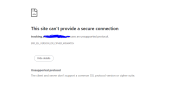
When I try to access my tracking URL in the browser, I get this error:
This site can’t provide a secure connection <br>tracking.xyz uses an unsupported protocol. <br>ERR_SSL_VERSION_OR_CIPHER_MISMATCH<br>
What I’ve done so far:
Thanks in advance!
I’m running into an issue with my MailWizz tracking domain and could use some help.
Problem:
When I try to access my tracking URL in the browser, I get this error:
This site can’t provide a secure connection <br>tracking.xyz uses an unsupported protocol. <br>ERR_SSL_VERSION_OR_CIPHER_MISMATCH<br>
What I’ve done so far:
- Added the tracking domain (tracking.xyz) in MailWizz
- Created the required CNAME record in my DNS provider pointing to the MailWizz tracking domain
- MailWizz dashboard shows the domain as verified
- The domain resolves correctly, but HTTPS does not work
- The tracking domain is not serving over HTTPS
- It appears there is no valid SSL certificate or there’s a mismatch in SSL configuration
- Does MailWizz automatically issue SSL certificates for tracking domains, or do I need to install one manually on the server?
- If manual setup is required, should SSL be installed on the delivery server (where MailWizz is hosted) or on the DNS/domain side?
- If using Let’s Encrypt, what’s the correct way to generate a certificate for a CNAME-based tracking domain?
- Could this be related to server config (NGINX/Apache) not handling the tracking domain properly?
Thanks in advance!